
Want a smooth typing feel without paying custom prices? See how the 5-layer acoustic dampening and pre-lubed Reaper switches perform for everyday use.
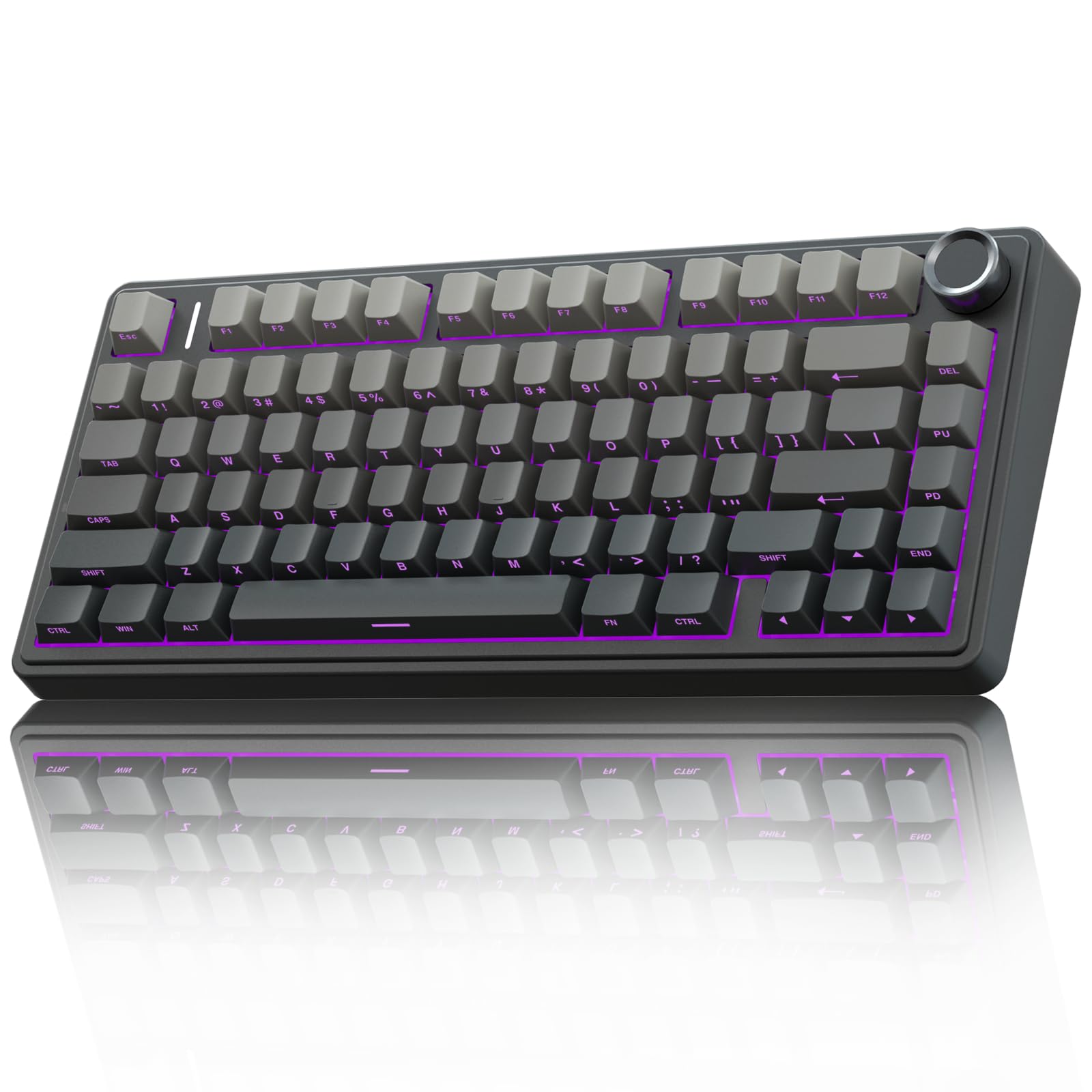
Quick Answer
The AULA F75 Pro Wireless provides an exceptionally smooth, cushioned typing experience and rich acoustics without requiring costly custom upgrades.
This compact keyboard combines pre-lubed linear switches, multi-layer acoustic dampening, and flexible wireless modes that easily outshine typical mass-market alternatives in daily use.
Perfect for: Gamers and everyday typists seeking an enthusiast-grade acoustic feel right out of the box without building a custom board.
Why it stands out: Its five-layer sound dampening and gasket-mounted architecture produce a deep acoustic tone typically reserved for premium bespoke setups.

If you are looking for an affordable way to upgrade your desktop setup, our comprehensive aula f75 pro wireless review examines how this compact board balances cost and enthusiast engineering. The peripheral market is crowded with flashy gaming gear, but few models deliver the refined acoustic tuning that custom keyboard hobbyists obsess over. AULA bridges that gap by packing high-grade acoustic foams, specialized mechanical switches, and multi-device wireless pairing into a neat 75 percent package.
📊 Key Specs at a Glance
| Feature | Specification |
|---|---|
| Layout | 75% compact (81 keys) |
| Switch Type | Pre-lubed Reaper Linear Switches |
| Mounting Style | Gasket mount design |
| Acoustic Dampening | 5-layer internal sound absorption |
| Hot-Swap Support | Universal 3-pin and 5-pin mechanical switches |
| Connectivity | 2.4GHz wireless, Bluetooth 5.0, USB-C wired |
| Battery Capacity | 4000 mAh rechargeable cell |
| Keycaps | Side-printed durable PBT |
| Backlighting | South-facing per-key RGB (16.8 million colors) |
| Dimensions & Weight | 322.7 × 143.2 × 43.1 mm; approx. 1000 grams (2.2 lbs) |
Acoustic Design and Build Architecture
The heart of this keyboard lies in its internal structure. AULA uses a gasket-mounted design paired with a 1.2mm single-key slotted PCB. This structure allows the interior typing plate to float slightly inside the housing, absorbing finger impact rather than bouncing force straight back into your hands. As a result, long typing sessions feel soft and forgiving on your joints.
Sound quality is another clear priority. The chassis incorporates five distinct layers of sound-dampening material, including molded foam padding and specialized gaskets. This layered barrier prevents the hollow plastic resonance that plagues entry-level keyboards, generating a distinct deep acoustic profile on every keystroke.
On top of the plate, you will find side-printed PBT keycaps. Because the legends are printed on the front-facing edge of the keycaps rather than the top, your fingers never touch the text, preventing oils from wearing down the lettering over years of continuous play. The side legends also give your desk an ultra-clean aesthetic when viewed from above.
Gaming Performance and Everyday Usability
Underneath each key sits a factory pre-lubed Reaper linear switch. In mechanical gaming, linear switches remain the standard because they actuate smoothly from top to bottom with zero tactile bump or audible click to slow you down. The factory application of switch lubricant eliminates scratchiness, making each press glide effortlessly during fast-paced competitive rounds.
The keyboard handles connectivity through three versatile channels. You can link via low-latency 2.4GHz wireless using the included USB dongle, cycle through three Bluetooth 5.0 profiles, or plug directly in with a braided USB-C cable. Across all modes, you can pair with up to five total devices, seamlessly switching between a primary gaming rig, work laptop, and tablet.
A tactile metal multifunction knob sits in the upper-right corner. It allows you to rapidly adjust operating volume or tweak backlighting brightness without reaching for desktop shortcut menus. Under the hood, a generous 4000 mAh battery delivers hours of cable-free uptime, even when you run the animated RGB effects.
Customization and Illumination Features
Even though the stock switches offer fantastic feedback, the PCB features hot-swappable switch sockets. These sockets accept both 3-pin and 5-pin mechanical switches, allowing you to swap in tactile or silent switches down the road without touching a soldering iron.
Illumination comes courtesy of south-facing RGB light-emitting diodes. South-facing diodes angle light toward the user, preventing physical interference with third-party Cherry-profile keycaps. You can choose between 16 static colors and 10 dynamic motion effects, customizing saturation and cycle speed directly from the hardware board shortcuts.
✅ Why It Still Stands Out: This keyboard is perfect for everyday desk setups with normal ambient light where touch typists prioritize long-lasting legends and deep acoustics. If you frequently game in a completely dark room, swapping on an aftermarket set of shine-through PBT keycaps takes just minutes thanks to the universal stems.
✅ Pros and ❌ Cons
✅ Pros
- Deep, pleasant sound profile straight out of the box due to five-layer dampening.
- Silky smooth keystrokes thanks to factory-lubricated Reaper linear switches.
- Flexible tri-mode connectivity supporting up to five hardware profiles.
- Convenient tactile metal knob for rapid volume and lighting adjustments.
- Universal hot-swap sockets compatible with 3-pin and 5-pin components.
❌ Cons
- Companion software configuration utility is limited to Windows systems.
- Side-printed legends lack backlighting transparency in dim lighting.
Who Should Buy It
The AULA F75 Pro Wireless Mechanical Keyboard (check price on Amazon) is tailored for gamers and office workers who want a high-end acoustic typing feel without paying custom artisan prices. If you love the clean 75 percent form factor—saving valuable desk space for sweeping mouse movements while keeping dedicated arrow keys—it fits the bill brilliantly.
Conversely, if your daily workflow demands on-the-fly macro remapping through open-source QMK/VIA software across macOS and Linux, an enthusiast board built specifically around open firmware will serve you better. Casual and competitive players who simply want to plug in and enjoy smooth gameplay will feel right at home.
Alternatives to Consider
If you want to cross-shop other options in this size class, consider the Epomaker EK68. It provides a slightly smaller 65 percent footprint with an integrated volume knob, though it trades away the dedicated function row found on 75 percent designs.
Another strong alternative is the Keychron V1 Max. While Keychron options often sit at a slightly higher investment tier, they offer native open-source QMK/VIA firmware support for comprehensive key-remapping across Mac, Windows, and Linux operating systems.
FAQ
Can you change the switches without soldering?
Yes. The circuit board features universal hot-swappable sockets. You can pull out the stock Reaper switches using a standard switch puller and snap in any standard 3-pin or 5-pin mechanical switches in seconds.
How do you connect the keyboard to multiple computers?
You can toggle between devices using the hardware switch and onboard key combinations. The keyboard connects to one system through the 2.4GHz USB receiver, three separate devices over Bluetooth 5.0 channels, and one machine via a direct USB-C wired connection.
Does the keyboard work with Mac computers?
The core typing functionality, volume knob, and Bluetooth connectivity work reliably with macOS. However, the downloadable configuration software designed for custom key assignments and detailed macro programming runs exclusively on Windows systems.
AULA F75 Pro Wireless Review: The Bottom Line
Our research demonstrates that this compact mechanical peripheral punches far above its price category. By incorporating genuine enthusiast components like factory-lubricated switches, multi-layer acoustic insulation, and an isolated gasket mount, AULA has delivered a typing feel that challenges boutique setups.
If you want a versatile, wireless desktop keyboard that feels remarkably smooth and sounds exceptionally full right out of the box, this model is an easy recommendation. Be sure to check the current price to see if it fits into your desk upgrade plans.
Sources: aulagaming.com, aulakeyboard.com, bestbuy.com, ign.com, rtings.com.
Looking for Active Tech Sales?
Smart Curation: Skip hours of scrolling. Our TOP TECH DEALS hub gathers active promotions, notable price drops, and highly rated gear we find across the market.
This review is based on manufacturer specs and verified owner feedback; we haven’t tested this product in person.