
Quick Answer
The PlayStation Portal is worth it if you own a PS5 and need a dedicated device for remote play within a strong home Wi-Fi network. This PlayStation Portal review will help you decide if it serves your specific purpose well, providing a comfortable, handheld PS5 streaming experience.
Best for: PS5 owners who want to play games in different rooms or without monopolizing the TV, and who have a robust home Wi-Fi 5 connection.
Skip it if: You expect a standalone gaming device, require Bluetooth audio, frequently play on unstable Wi-Fi networks, or need extended battery life beyond 3-5 hours.
📊 Key Specs at a Glance
| Feature | Specification |
|---|---|
| Display | 8-inch LCD, 1920 x 1080 (1080p) resolution, 60Hz refresh rate, touch-enabled IPS panel (no HDR) |
| Processor | Snapdragon 600-series (primarily for video decoding) |
| Storage | None (streaming device, saves on PS5) |
| Battery Life | 3-5 hours (typical use), up to 7-9 hours (reduced settings) |
| Connectivity | Wi-Fi 5 (802.11ac), PlayStation Link wireless audio, 3.5mm headphone jack, USB-C (charging only) |
| Bluetooth Audio | Not supported |
| Weight | 1.15 pounds (approximately 522 grams) |
Design and Build: A DualSense Split in Half
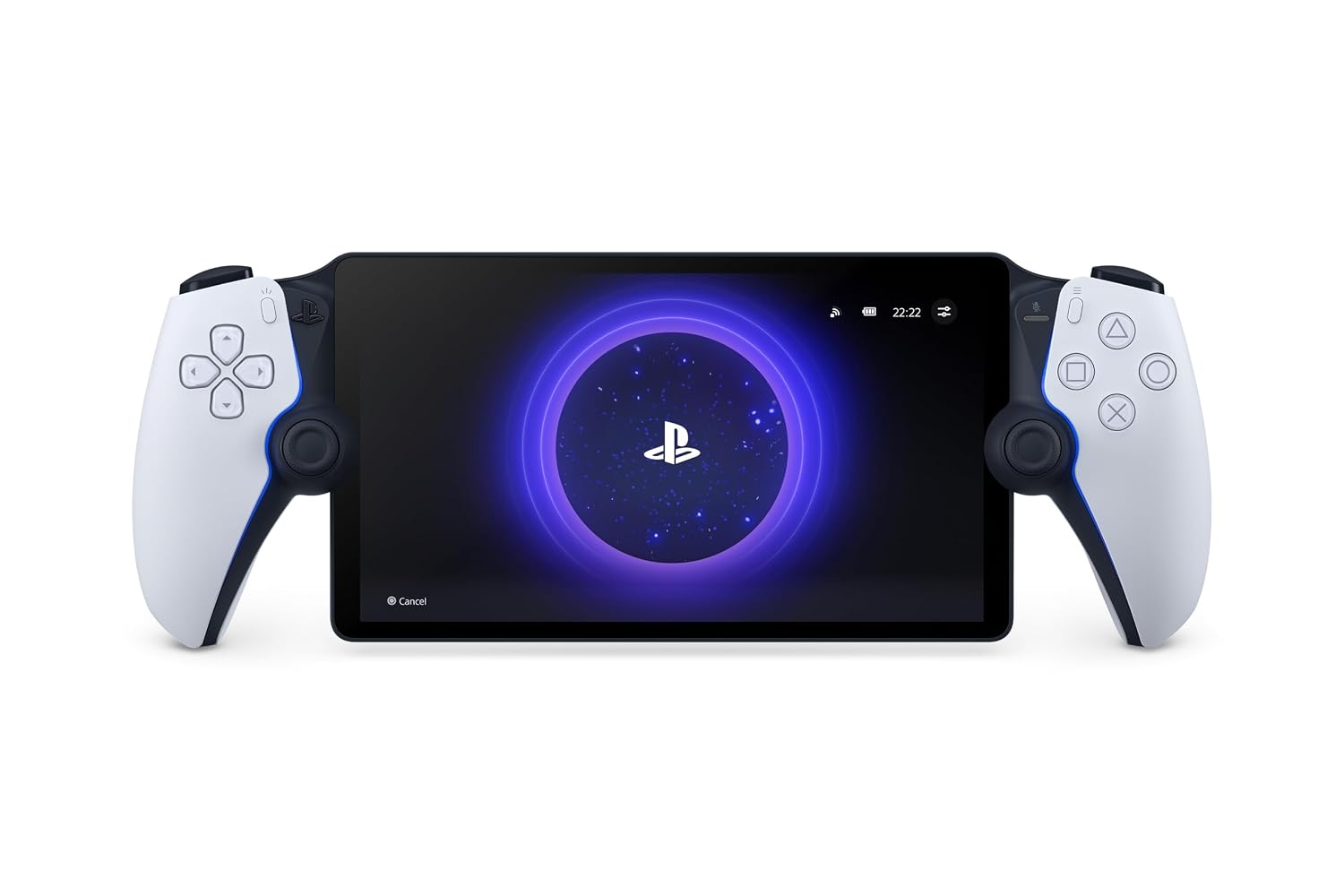
The PlayStation Portal immediately stands out with its distinctive design: an 8-inch LCD screen flanked by two halves of a DualSense controller. This aesthetic choice makes it instantly recognizable and familiar to any PS5 owner. The form factor is generally comfortable, closely mimicking the ergonomic grip of the standard DualSense controller.
The 8-inch LCD display offers a 1080p resolution at 60Hz. While it doesn’t feature OLED technology or HDR support, the screen size is a major advantage for portable gaming, providing ample screen real estate for immersive play. The touch-enabled IPS panel delivers clear visuals and responsive input for navigating menus.
Performance: The Remote Play Experience
The core function of the PlayStation Portal is to stream games from your PlayStation 5 console, leveraging its Snapdragon 600-series processor for efficient video decoding. For the best experience, you need a strong and stable Wi-Fi 5 (802.11ac) connection, ideally with your PS5 connected via Ethernet. Sony recommends a minimum broadband internet speed of 15Mbps for optimal performance.
When conditions are ideal, the PlayStation Portal delivers a remarkably smooth streaming experience, closely replicating playing directly on your PS5. However, the device’s performance is heavily dependent on your network stability. Many owners report that inconsistent streaming quality and occasional lag are common if your Wi-Fi signal is weak or congested, or if the PS5 itself is connected wirelessly. This is a crucial aspect of any PlayStation Portal review: the device’s quality is directly tied to your home network setup.
Connectivity and Battery Life
The PlayStation Portal features Wi-Fi 5 for its primary connection to your PS5. For audio, it exclusively uses PlayStation Link wireless technology, requiring compatible headphones like the Pulse Elite wireless headset or Pulse Explore wireless earbuds. It does include a standard 3.5mm headphone jack for wired audio, which is a welcome addition.
A notable omission is Bluetooth audio support. This means your existing Bluetooth headphones will not work with the Portal, a point frequently highlighted in many “playstation portal review” discussions. Power is supplied via a USB-C port, which is solely for charging.
Battery life typically ranges from 3 to 5 hours during active gameplay with full brightness and haptic feedback. This can extend to 7-9 hours if you reduce settings. While some find this acceptable, others consider it on the shorter side for extended gaming sessions. This directly addresses whether the “ps portal worth it” question depends on your desired play duration.
Is PlayStation Portal Good? A PlayStation Portal Review of Its Purpose
The PlayStation Portal is not a standalone console; it is a dedicated remote player for your PS5. It cannot run games natively, browse the web, or stream from other services. This limitation is key to understanding its value. It’s built for one specific purpose: providing a portable PS5 experience within your home network. So, “is playstation portal good” largely depends on your need for this specific function.
✅ Pros and ❌ Cons
✅ Pros
- Large 8-inch 1080p LCD screen provides an immersive portable view.
- Familiar DualSense controller experience with haptic feedback and adaptive triggers.
- Dedicated hardware offers a more stable and consistent remote play experience than a phone/tablet.
- Simple setup and integration with your existing PS5 console.
- Built-in 3.5mm headphone jack for wired audio.
❌ Cons
- No Bluetooth audio support, limiting headphone choices.
- Battery life of 3-5 hours can be short for some gaming sessions.
- Not a standalone device; cannot play games natively or stream from other services.
Who Should Buy It (and Who Shouldn’t)
You should consider the PlayStation Portal if you are a PS5 owner who frequently finds the main TV occupied, or if you simply prefer to game in different rooms of your house. It’s ideal for those with a robust 5GHz Wi-Fi network and a PS5 connected via Ethernet, ensuring the best possible streaming quality. If your primary goal is to extend your PS5 gaming to a handheld form factor within your home, the Portal delivers on that promise.
However, if you’re looking for a versatile handheld gaming device that can run games natively, browse the internet, or connect to Bluetooth headphones, the PlayStation Portal is not for you. It’s also not suited for those with unreliable home Wi-Fi or who expect to play consistently away from their home network. For these users, the “ps portal worth it” equation quickly shifts to a “not worth it” conclusion.
Alternatives to Consider
If the PlayStation Portal doesn’t fit your needs, other handheld gaming devices offer different experiences. The Nintendo Switch 2 (released in early 2026) offers native handheld gaming, portability, and a vast library of exclusive titles. For a more PC-centric experience, the Steam Deck OLED provides access to your Steam library on a powerful handheld device. Both offer standalone gaming without relying on a home console connection.
FAQ
Is the PlayStation Portal good for playing games outside the home?
While technically possible, the PlayStation Portal is primarily designed for use on your home Wi-Fi network where your PS5 is located. Playing outside the home requires an extremely stable, high-speed internet connection on both ends, and even then, performance is often inconsistent due to latency and signal fluctuations. It’s best thought of as an in-home remote play device.
What kind of internet speed is recommended for the PlayStation Portal?
Sony recommends a broadband internet Wi-Fi connection of at least 15Mbps for a better remote play experience. We suggest using a 5GHz Wi-Fi network at home, and connecting your PS5 directly to your router via an Ethernet cable for optimal stability and minimal lag.
Is the PlayStation Portal worth it if I already have a powerful gaming phone or tablet?
The “ps portal worth it” question is key here. While you can use a phone or tablet with a controller clip for PS Remote Play, the Portal offers a dedicated, integrated experience with a larger screen and a full DualSense controller feel. If you prioritize ergonomics, a larger screen, and a device purpose-built for PS5 remote play without the distractions of a phone, the Portal provides a superior, more comfortable experience. If versatility and cost-saving are priorities, your existing device might suffice.
Final Verdict
In this PlayStation Portal review, we find that the device is highly specialized. It excels at its singular purpose: delivering a comfortable and immersive PS5 remote play experience within your home. The large 8-inch screen and integrated DualSense features make it an attractive option for those who want to game without hogging the TV.
However, its limitations—lack of standalone functionality, no Bluetooth audio, and heavy reliance on a robust home Wi-Fi network—are significant. If your network infrastructure isn’t up to par, or if you expect a versatile, go-anywhere gaming handheld, you will likely be disappointed. For the right user, the PlayStation Portal is a well-executed niche product that genuinely enhances the PS5 ecosystem. For everyone else, its value proposition is limited.
Sources: wikipedia.org, shacknews.com, ign.com, kitguru.net, playstation.com, reviewed.com.
Looking for Active Tech Sales?
Smart Curation: Skip hours of scrolling. Our TOP TECH DEALS hub gathers active promotions, notable price drops, and highly rated gear we find across the market.